Finger drumming on the Akai MPC Sample
The MPC Sample is Akai’s compact, battery-powered MPC from 2026 — a sampler with 16 MPC pads that you can take anywhere. It is a great practice partner for finger drumming: load a kit, sit it on your lap and follow the patterns on this site pad by pad.
By  Re: TUNES · Updated
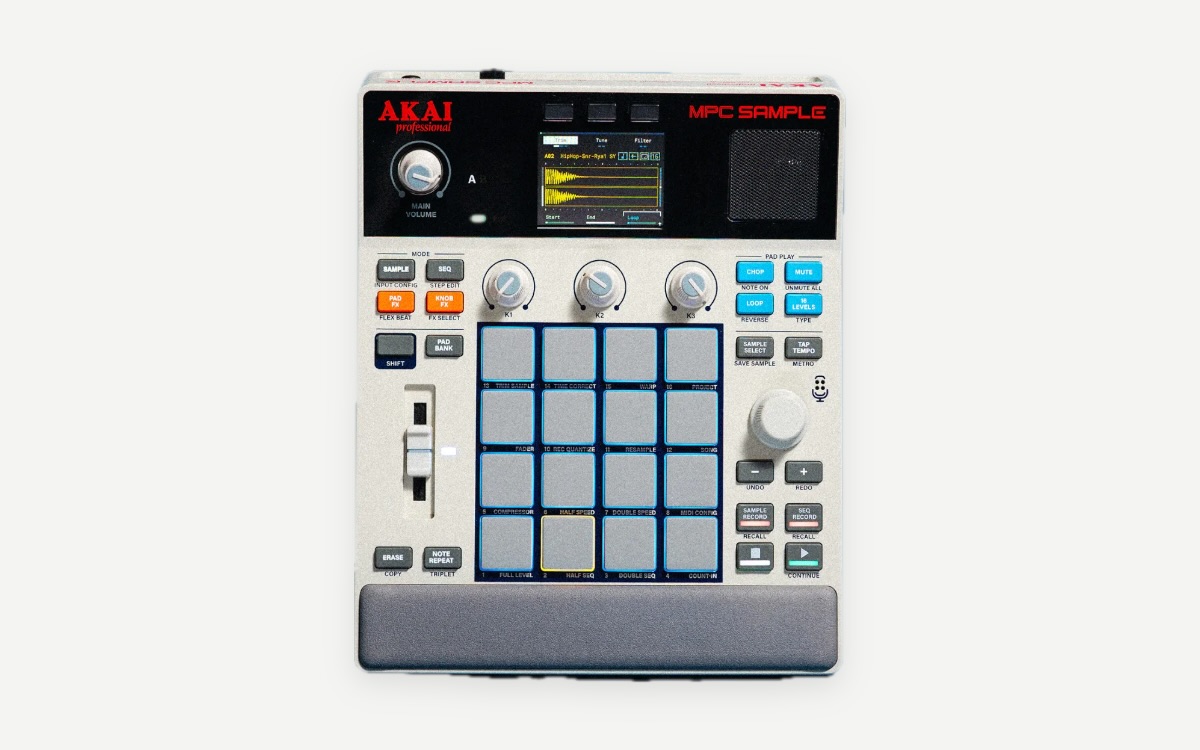
MPC Sample at a glance
| Pads | 16 RGB, velocity-sensitive, with polyphonic aftertouch |
|---|---|
| Type | Standalone sampler / groovebox |
| Power | Rechargeable battery, up to about 5 hours |
| Screen | 2.4-inch colour LCD |
| Storage | 8 GB internal, plus SD card slot |
| Connections | USB-C (MIDI, audio, charging), MIDI in/out, sync out |
| Launch price | $399 / £349 / €399 |
| Released | March 2026 |
Watch it played
Is the MPC Sample good for finger drumming?
- Velocity-sensitive MPC pads, so ghost notes and accents come out the way you play them.
- Battery power: practise away from the desk, which is where most finger-drumming practice time is won.
- MPC pad numbering — pad 1 bottom-left — is the same numbering the pad view on fingerdrum.io uses.
Things to watch
- It is a sampler first: build one drum program with one sound per pad before you start practising patterns.
- Turn off note repeat and any pad effects while you learn a groove, so every hit you hear is one you played.
Set up the MPC Sample to practise with fingerdrum.io
- Load a drum kit into a single program (kick, snares, hats, toms and cymbals).
- Arrange the sounds on the 16 pads the way you want to play them — start with the Standard 4×4 below, or a hand-isolation layout.
- On fingerdrum.io, open the Pads page and set the same layout so the pad view matches your MPC.
- Pick a level-1 pattern, drop the tempo to 60–70 % and play along with the site’s groove, following the finger labels.
- When a section feels easy, raise the tempo in small steps, or switch on the tempo trainer.
Recommended pad layout
Start with the Standard 4×4 — kick and snares on the bottom row, hats above them — or, if you want to play like a drummer, the hand-isolation layout with kick and snare under one hand and the hats under the other. Read the pad layout guide for how to choose.
Patterns to start with on the MPC Sample
- First Bap — your first boom-bap groove: kick, snare and hats only.
- Crate Digger — dusty MPC swing with ghost notes.
- Rapid Fire — the araabMUZIK-style MPC roll routine, for later.
Questions
Is the MPC Sample good for finger drumming?
Yes. It has 16 velocity-sensitive MPC pads with polyphonic aftertouch and runs on battery, so it works well as a portable finger-drumming practice pad with its own sounds.
Does fingerdrum.io work with the MPC Sample?
fingerdrum.io doesn’t receive MIDI from your controller yet. Open a pattern, set your layout on the Pads page so the pad view matches your hardware, and play along on your own sounds while the site plays the groove and shows which pad and finger comes next. Slow it down and loop the bars you’re working on.
How are the pads numbered?
Like every MPC, pad 1 is bottom-left and pad 16 is top-right. fingerdrum.io numbers its pad view the same way, so a layout you build on the MPC maps one-to-one.
Other controller guides
- Finger drumming on the Akai MPC Live III
- Finger drumming on the Native Instruments Maschine
- Finger drumming on the M-VAVE SMC-PAD
Sources
Specs and prices as published at launch; checked 2026-09-28.