Finger drumming on the Akai MPC Live III
The MPC Live III is Akai’s battery-powered standalone MPC, released in October 2025. Its 16 full-size MPCe pads sense where and how hard you hit, not just how fast — powerful for performance, and worth setting up carefully while you learn patterns.
By  Re: TUNES · Updated
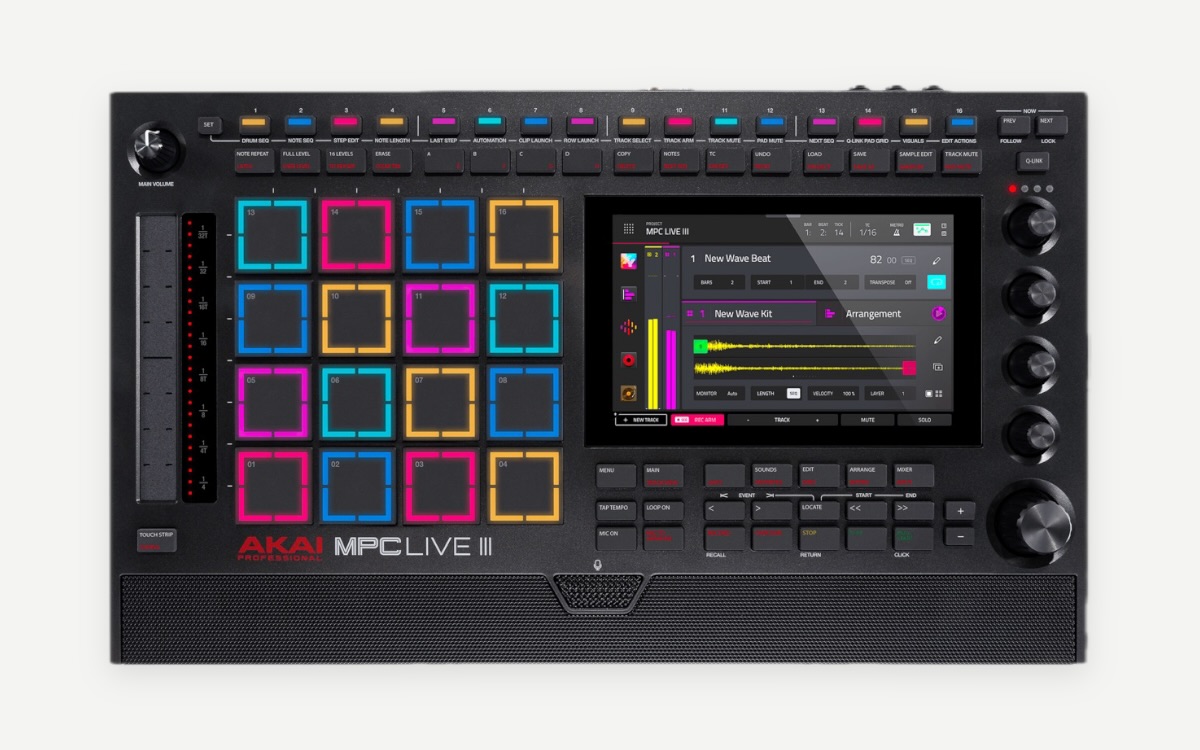
MPC Live 3 at a glance
| Pads | 16 full-size RGB MPCe pads with 3D sensing (velocity, pressure and position) |
|---|---|
| Step sequencer | 16 RGB step buttons across 4 pages (64 steps) |
| Type | Standalone MPC, or controller for MPC software over USB-C |
| Power | Built-in battery, up to about 3 hours of typical use |
| Screen | 7-inch multi-touch |
| Processor / storage | 8-core CPU, 8 GB RAM, 128 GB storage |
| Connections | USB-C (audio and 32 channels of MIDI), 5-pin MIDI in/out |
| Launch price | $1,699 / £1,399 / €1,649 |
| Released | October 2025 |
Watch it played
Is the MPC Live 3 good for finger drumming?
- Full-size MPC pads with plenty of space between them for two-handed playing.
- MPCe pads can play up to four variations per pad depending on where you hit — closed and open hi-hat on one pad, for example.
- Standalone with a battery: a complete practice and performance kit without a laptop.
Things to watch
- While you learn a pattern, set each pad to play one sound. If a pad plays a different sample depending on where you hit, the pad view on fingerdrum.io won’t match what you hear.
- Once a groove is solid, try moving articulations (open/closed hat, rim/snare) onto pad corners to free up pads.
Set up the MPC Live 3 to practise with fingerdrum.io
- Create a drum program and put one sound on each pad; leave the MPCe position layers off for now.
- Choose a layout — the Standard 4×4 below or the Dragon Finger Drums hand-isolation layout — and set the same one on the Pads page here.
- Check the velocity curve: soft taps should give quiet ghost notes, not silence.
- Open a pattern, loop the main groove at 60–70 % tempo and play along, following the finger labels.
- Speed up with the tempo trainer, then try the fills and the full-song arrangement.
Recommended pad layout
Start with the Standard 4×4 — kick and snares on the bottom row, hats above them — or, if you want to play like a drummer, the hand-isolation layout with kick and snare under one hand and the hats under the other. Read the pad layout guide for how to choose.
Patterns to start with on the MPC Live 3
- Bass Break — an MPC Live breakbeat in the style of DJ Nick Brown.
- Rapid Fire — MPC-style trap rolls to test pad response.
- Amen Chop — the Amen break at 170 BPM, for when you’re ready.
Questions
Is the MPC Live III good for finger drumming?
Yes. It has 16 full-size velocity- and pressure-sensitive MPCe pads with room for both hands, and the 3D sensing adds extra articulations per pad once you know a groove.
Does fingerdrum.io work with the MPC Live III?
fingerdrum.io doesn’t receive MIDI from your controller yet. Open a pattern, set your layout on the Pads page so the pad view matches your hardware, and play along on your own sounds while the site plays the groove and shows which pad and finger comes next. Slow it down and loop the bars you’re working on.
What are MPCe pads?
Akai’s 3D-sensing pads: besides velocity and pressure, each pad senses where you hit it, so one pad can trigger up to four variations of a sound or modulation.
Other controller guides
- Finger drumming on the Akai MPC Sample
- Finger drumming on the Native Instruments Maschine
- Finger drumming on the M-VAVE SMC-PAD
Sources
Specs and prices as published at launch; checked 2026-09-28.